¶ Migrate Server (Free to Premium)
Upgrade your server and transfer all your data seamlessly!
Move from a free server to a premium server without losing any progress, worlds, or configurations.
¶ Why Migrate to Premium?
Migrating from a free server to a premium server gives you access to enhanced resources, better performance, and more features while preserving all your hard work and progress.
¶ Free Server Features
- Basic resources
- Hibernation system
- Ad-based renewal
- Standard support
¶ Premium Benefits
- Enhanced resources
- 24/7 Uptime
- No hibernation
- Priority Support
- Advanced features
Don't Worry: This migration process is completely safe and preserves all your data, including worlds, configurations, mods, and plugins!
¶ Before You Start
Make sure you have everything ready before starting the migration process:
¶ Migration Checklist:
- ✅ Premium server created and accessible
- ✅ SFTP access configured for both servers
- ✅ Free server stopped (to ensure data consistency)
- ✅ Stable internet connection for file transfers
- ✅ FileZilla or SFTP client installed and ready
Important: Stop your free server before starting the migration to prevent data corruption during the transfer process.
¶ Method 1: Archive Transfer (Recommended)
The archive method compresses all your server files into a single file, making it faster and more reliable to transfer. This is the recommended approach for most users.
¶ Step 1A: Create Server Archive
- Go to your free server dashboard
- Click "FILES" in the sidebar to open File Manager
- Select ALL files using the checkboxes (or Ctrl+A)
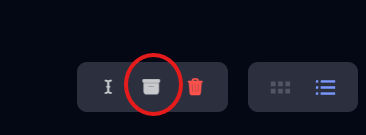
- Look for "Compress" button at the bottom right
- Click "Compress" and wait for the archive to be created
- The archive file will appear in your file list
¶ Step 1B: Download the Archive
- Right-click the archive file that was created
- Select "Download" from the context menu
- Wait for download to complete (may take several minutes)
- Save the file somewhere you can easily find it
¶ Step 1C: Upload to Premium Server
- Connect to your premium server via SFTP (FileZilla)
- Navigate to the server root directory
- Upload the archive file to the premium server
- Wait for upload to complete
- Right-click the uploaded archive
- Select "Unarchive" or "Extract"
- Wait for extraction to complete
Why This Method? Compressing files reduces transfer time, prevents file corruption, and maintains folder structure perfectly.
¶ Method 2: Direct SFTP Transfer (Advanced)
For advanced users who prefer direct file management, you can transfer files directly via SFTP without creating an archive. This method gives you more control but takes longer.
¶ Direct SFTP Transfer Process:
- Open two SFTP connections in FileZilla (or use two windows)
- Connect to your free server on the left side
- Connect to your premium server on the right side
- Navigate to root directory on both servers
- Select all files/folders from the free server
- Drag and drop or right-click and "Download" to your computer
- Upload all files to the premium server
- Verify all files transferred correctly
¶ Transfer Priority Order:
- World folders (world, world_nether, world_the_end) - Most important!
- server.properties - Server configuration
- mods folder - If you have a modded server
- plugins folder - If you have plugins
- config folder - Mod/plugin configurations
- Other files (logs, etc.) - Transfer last
Time Consideration: This method can take 30-60 minutes depending on your server size and internet speed. Be patient!
¶ SFTP Connection Setup
You'll need SFTP access to both your old and new servers. Here's where to find the connection details:
¶ Getting SFTP Details:
- Go to server dashboard
- Click "Settings" in the sidebar
- Find "SFTP Details" section
- Copy the server address and username
- Use your Tick Hosting password
¶ Complete the Migration
After transferring all files, you need to complete the migration process and verify everything works correctly.
¶ Finalization Checklist:
- Verify all files transferred to the premium server
- Check folder structure matches the original
- Start the premium server and monitor the console
- Test server functionality (connect and play)
- Verify world data (buildings, items, progress)
- Test mods/plugins if applicable
- Update server IP with players
- Delete old server (optional, after confirming everything works)
¶ Testing Your Migrated Server:
- Connect with your Minecraft client
- Check if your builds are intact
- Verify your inventory items
- Test server commands
- Confirm mods/plugins work
- Check server performance
Don't Forget: Update your players with the new server IP address so they can connect to your upgraded premium server!
¶ Migration Troubleshooting
¶ 🎉 Migration Complete!
Congratulations! You've successfully migrated your server from free to premium. Enjoy the enhanced performance, increased resources, and improved features. Your players will notice the better experience immediately!
Pro Tip: Keep the free server for a few days as backup before deleting it, just to be safe!